August 2011 Painting

Please link your painting and modelling projects here for feedback and to show off your work
User avatar
The Other Dave
Destroyer of Worlds
Posts: 5300
Joined: Tue May 18, 2010 3:46 am
Location: Nagoya
Contact:

Re: August 2011 Painting

Post by The Other Dave » Sat Aug 13, 2011 6:24 am

...and my Sherman platoon is done, too.

Image

Company HQ to paint and then I'm out of FoW models for a bit, heh.
Feel free to call me Dave!

User avatar
Primarch
Evil Overlord
Posts: 11539
Joined: Fri May 14, 2010 9:33 am
Location: Nagoya
Contact:

Re: August 2011 Painting

Post by Primarch » Wed Aug 17, 2011 12:23 pm

I know they're not 15mm or anything, but here are some minis I have just finished up.
Image
Image

Up close they are a little messy, but they look good as a unit.
I learned an important lesson when doing these guys. "Dont forget to paint in the eyeballs until after you have attached models to a unit base, its a wee bit tricky to do it after."
Painted Minis in 2014: 510, in 2015: 300, in 2016 :369, in 2019: 417, in 2020: 450

User avatar
The Other Dave
Destroyer of Worlds
Posts: 5300
Joined: Tue May 18, 2010 3:46 am
Location: Nagoya
Contact:

Re: August 2011 Painting

Post by The Other Dave » Wed Aug 17, 2011 12:30 pm

Nice! Nothing quite like a fully-painted unit.

(Sorry if I've been spamming up the thread, too. I just like to share when I'm on a productive painting binge.)
Feel free to call me Dave!

User avatar
Primarch
Evil Overlord
Posts: 11539
Joined: Fri May 14, 2010 9:33 am
Location: Nagoya
Contact:

Re: August 2011 Painting

Post by Primarch » Wed Aug 17, 2011 1:02 pm

The Other Dave wrote:Nice! Nothing quite like a fully-painted unit.

(Sorry if I've been spamming up the thread, too. I just like to share when I'm on a productive painting binge.)
Thanks,
And I dont think there has been any spam on this thread just yet. :D
Painted Minis in 2014: 510, in 2015: 300, in 2016 :369, in 2019: 417, in 2020: 450

User avatar
job
Destroyer of Worlds
Posts: 3368
Joined: Mon Jul 12, 2010 10:29 pm
Location: Nagoya

Re: August 2011 Painting

Post by job » Wed Aug 17, 2011 1:57 pm

Primarch wrote:I know they're not 15mm or anything, but here are some minis I have just finished up.
Image
Image

Up close they are a little messy, but they look good as a unit.
I learned an important lesson when doing these guys. "Dont forget to paint in the eyeballs until after you have attached models to a unit base, its a wee bit tricky to do it after."
Nice looking lobsterbacks, Prim. :D
Models Painted, 2020
70 28mm miniatureS

User avatar
me_in_japan
Moderator of Swoosh!
Posts: 7480
Joined: Fri May 14, 2010 2:46 pm
Location: Tsu, Mie, Japan

Re: August 2011 Painting

Post by me_in_japan » Wed Aug 17, 2011 3:04 pm

as i said yesterday when I saw em in person - looking good :) Not that I approve of historicals :D but still, nice paint job :P

@ToD - the more "looky what i painted" posts we get in the painty threads, the better.

As for me, I am painting this month, as those Ive played against this week will attest, its just that Ive only half painted a venom, 5 grotesques and a talos/cronos. I had to convert the grotesques a a fair bit, as well as unbox and stick together the venom, 5 scourges, a brass arachnid, the talos, a skarlock thrall, Erebus the warjack and Lord Exhumator Scaverous (...and breeaaaaaathe.)

I also started on my Klaivex. Im having trouble with black. highlighting - what to do? If it was just a wee bit of black id say grey highlights would be fine, but an incubi (or klaivex) is almost all black. I dont want to highlight grey (looks boring), BUT if I start going into colours it causes problems for the purple secondary and blue-white tertiary colours im using (and cant change. Incubi masks are white (blueish cold white, in my case) and all my deldar power weapons are purple nmm-kinda looking style. So, how do i highlight black when those are my 2nd/3rd colours. *sound of MiJ in deep thought.* :?:

purple-white for the mask, freeing me up to have more flexibility in my black, perhaps?

answers on a postcard...
current (2019) hobby interests
eh, y'know. Stuff, and things

Wow. And then Corona happened. Just....crickets, all the way through to 2023...

User avatar
Primarch
Evil Overlord
Posts: 11539
Joined: Fri May 14, 2010 9:33 am
Location: Nagoya
Contact:

Re: August 2011 Painting

Post by Primarch » Sat Aug 20, 2011 7:05 am

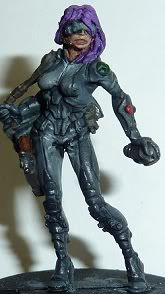
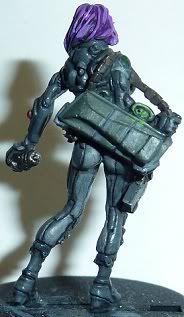
A while back I was asked to acquire and paint some Inifinity minis for my local RPG group by Miggy Smallz, a forum member.
I have just finished work on Miggy's new mini. He originally asked me to paint it to look like an anime character, Motoko Kusanagi from Ghost in the Shell, with this as the colour scheme to work with.

I had to use a flash on the camera as the mini itself is quite dark (being mainly greys). Obviously its not exactly the same as the mini isnt supposed to be Kusanagi. Following the picture, I went for a light grey on the inner layers of clothing and a dark grey on the outer. I also tried to do a spot of OSL on the scanner device on her wrist.
Image
Image
Painted Minis in 2014: 510, in 2015: 300, in 2016 :369, in 2019: 417, in 2020: 450

User avatar
me_in_japan
Moderator of Swoosh!
Posts: 7480
Joined: Fri May 14, 2010 2:46 pm
Location: Tsu, Mie, Japan

Re: August 2011 Painting

Post by me_in_japan » Sat Aug 20, 2011 8:03 am

The mini looks a bit splotchy, BUT I'm 99% sure thats from the flash. Are you able to set the exposure time on your camera? If so, you could reshoot the pics with a (significantly) longer exposure and no flash. Also, a dark background (I've been known to use the missus' black scarf) will make the greys stand out more. None of this is intended as a negative comment on the paint job, which looks good, just on how to make it look better in a photo.
current (2019) hobby interests
eh, y'know. Stuff, and things

Wow. And then Corona happened. Just....crickets, all the way through to 2023...

User avatar
Primarch
Evil Overlord
Posts: 11539
Joined: Fri May 14, 2010 9:33 am
Location: Nagoya
Contact:

Re: August 2011 Painting

Post by Primarch » Sat Aug 20, 2011 8:49 am

me_in_japan wrote:Are you able to set the exposure time on your camera?
Maybe, but I dont know how.
me_in_japan wrote:Also, a dark background (I've been known to use the missus' black scarf) will make the greys stand out more.
Cheers, I'll bear that in mind. :D
Painted Minis in 2014: 510, in 2015: 300, in 2016 :369, in 2019: 417, in 2020: 450

User avatar
me_in_japan
Moderator of Swoosh!
Posts: 7480
Joined: Fri May 14, 2010 2:46 pm
Location: Tsu, Mie, Japan

Re: August 2011 Painting

Post by me_in_japan » Sat Aug 20, 2011 10:19 am

generally, when taking close up pics of small things that dont move (i.e. minis) its better to use a long exposure than the flash. Most standard flashes are set to illuminate a group of people standing about 1-2 metres away. Any further and its too dull, any closer, and its all overexposed. Flashes are, basically, useless for minis (unless you get a proper set up with light baffles n whatnot.)

To take a decent mini pic it helps if you:

1) put camera and mini on a non-wobbly surface. A tripod is ideal, but a desk/pile of books is fine too.
2) set the exposure quite long. Basically long exposure=shutter open longer=more light gets in= brighter pic.
3) Use the timer setting on the camera. This removes the risk of wobble when you press the shutter button.
4) use the macro setting on the camera (this is usually a wee flower icon)

if you do the above (which every basic point n shoot camera should be able to handle) then your pics will be loverly.
current (2019) hobby interests
eh, y'know. Stuff, and things

Wow. And then Corona happened. Just....crickets, all the way through to 2023...

Post Reply

Return to “Painting and Modelling - ペイント”